





Capture One Pro pixeltwister
relaxed professional image editing
Capture One Pro Midi Controller
The overall system consists of the following elements:
-
- Capture One Pro
- Capture One Pro Keyboard Shortcut File
- MIDI Translator Software
- MIDI Keyboard Mapping
- Midi fighter twister Controller
-
-
-
- Capture One Pro Keyboard Shortcut File
- MIDI Translator Configuration File
- Midi fighter twister Configuration File
- Installation Documentation
- Attention, there are additional costs
see below
-
-
You will also need:
-
-
-
- Capture One Pro 12 or 20
- Bome MIDI Translator Software (59€)
- Midi fighter twister Controller (259€)
-
-
Works with Windows 10 and Mac OS.
Important Support on my part only for Mac OS and for German keyboard. All files have been extensively tested on Windows and Mac OS. However, every Windows system is different. I cannot give support for this. It can happen that some functions are not available under Windows due to different keyboard drivers. In this case you have to reassign them yourself. It is not particularly difficult.
The possibilities in detail:
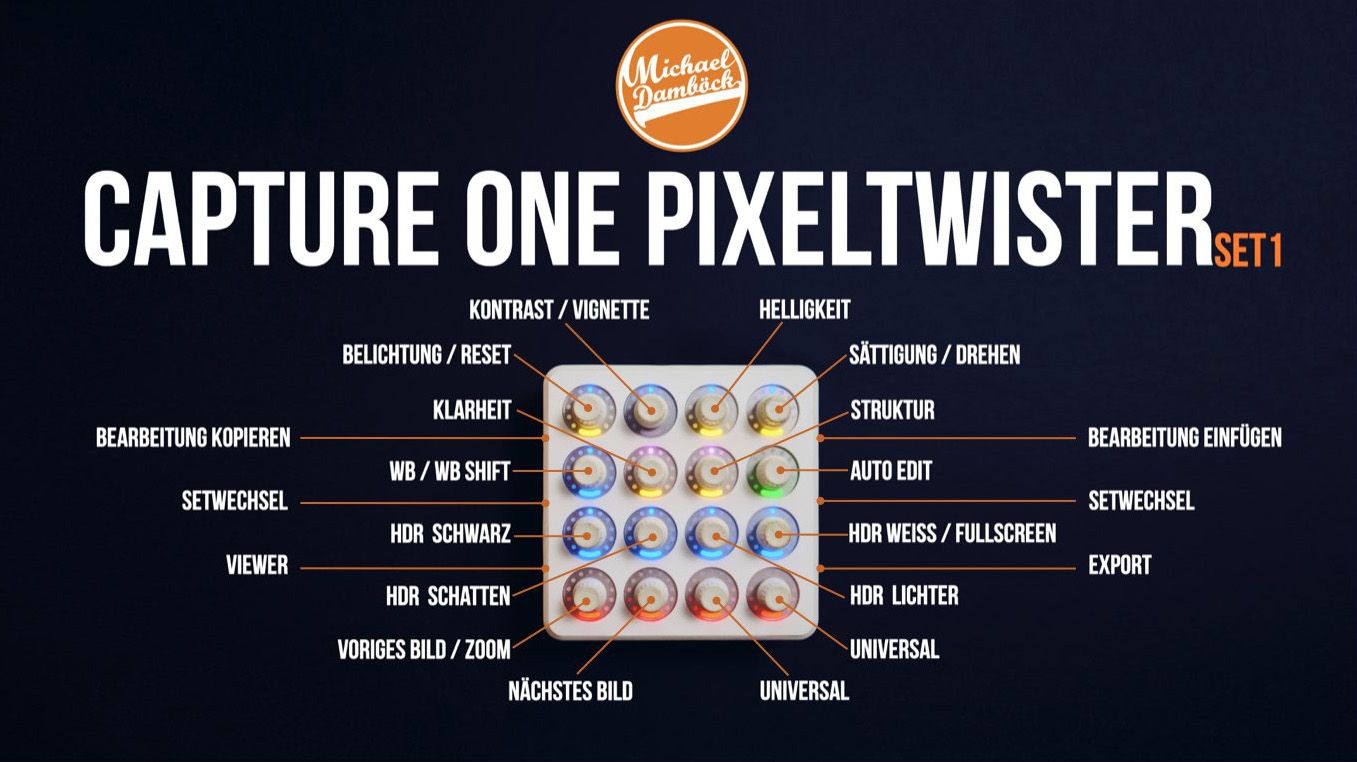
Capture One in your hands
-
-
-
- Exposure / Reset Image
- Contrast / Vignette
- Brightnes
- Saturation / Rotate
-
-
-
-
-
- White Balance / White Balance Shift
- Clarity
- Structure
- Automatic Edit
-
-
-
-
-
- HDR Black
- HDR Shadow
- HDR Highlight
- HDR White
-
-
-
-
-
- previous image / Zoom
- next image
- Universal *
- Universal *
-
-
Fuctions of the side buttons:
-
-
-
- Copy Edit
- Switch Set
-
-
-
-
-
- Show/Hide Viewer
- paste edit
- switch Set
- Export
-
-
* Universal Encoder
I developed the two universal encoders to allow you to control almost any tool in Capture One.
You can see how this works in my introductory video.
-
-
-
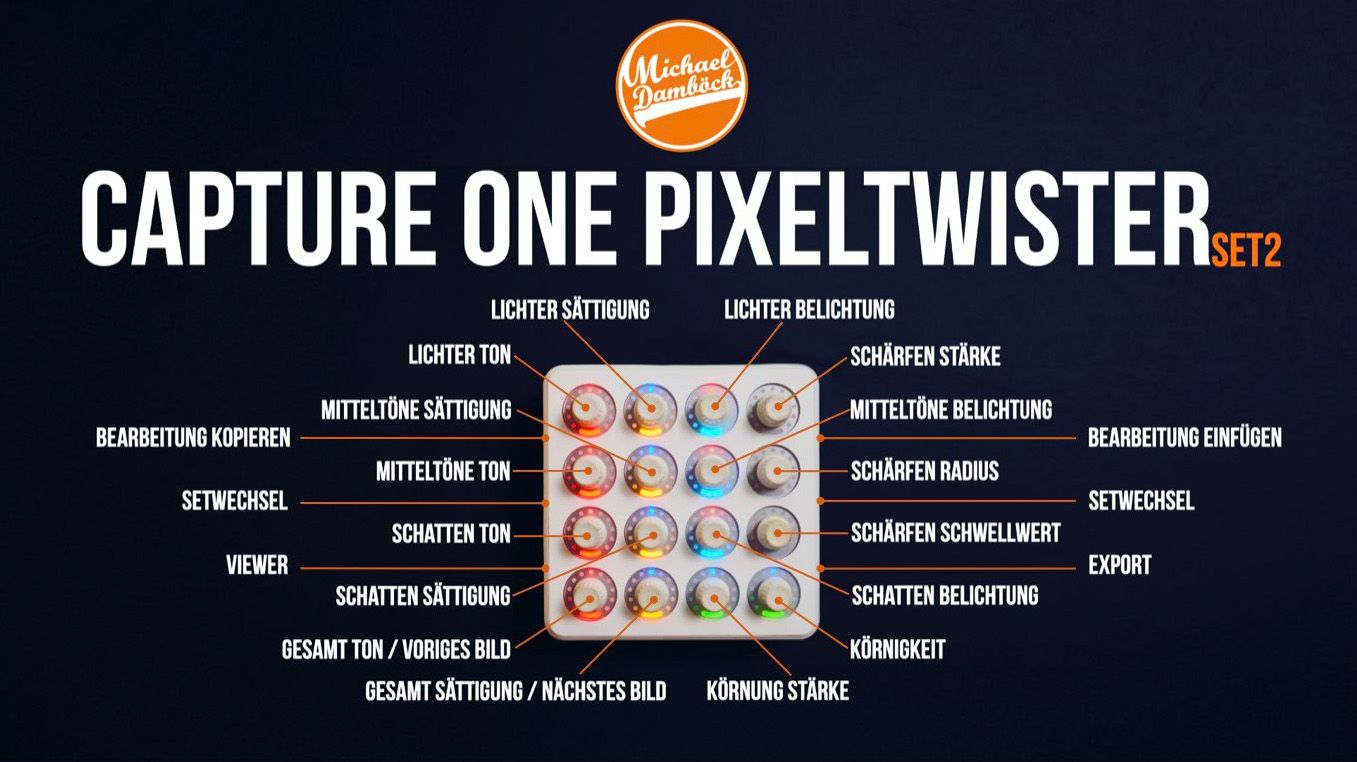
- Highlights tone
- Highlights saturation
- Highlights exposure
- sharpening amount/li>
-
-
-
-
-
- Midtones tone
- Midtones saturation
- Midtones exposure
- sharpening Radius
-
-
-
-
-
- Shadow tone
- Shadow saturation
- Shadow exposure
- sharpening threshold
-
-
-
-
-
- Global tone / previous image
- Global saturation / next image
- Grain Amount
- Grain Size
-
-
Functions of the side buttons:
-
-
-
- copy edit
- switch set
- show/hide viewer
-
-
-
-
-
- paste edit
- switch set
- Export
-
-


kennelpeter –
Die Idee Capture One mit einem Dji – Midi Controller zu steuern ist schlicht genial. Meine Erfahrungen damit sind nur positiv. Die Bildbearbeitung bekommt dadurch eine ganz neue Dimension. Alles ist viel intuitiver; man arbeitet kreativer, schneller und es macht einfach Spass.
Die Installation ist gut beschrieben und relativ einfach – im Gegensatz zur eigentlichen Konfiguration, welche doch etwas Erfahrung, Zeit und sicherlich auch Geduld benötigt. Aber dafür gibt es eben den Pixeltwister von Michael zu einem wirklich fairen Preis
(wenn man bedenkt, dass man damit nicht nur viel Zeit einspart, sondern, wenn notwendig, auch einen sehr guten, professionellen und persönlichen Support bekommt)
Die Settings sind sinnvoll und logisch aufgebaut. Man kann daher diese 2 x 16 Drehknöpfe in kurzer Einarbeitungszeit auswendig steuern, zumal auch entsprechend farbige Lichter die Orientierung erleichtern. Für mich bekommen die Idee und das pixeltwister – Angebot eine Fünf Sterne Bewertung.
Verifizierter Kauf. Mehr Informationen